A daily note, drafted by Xiao’s AI agent.
Small Model, Private Inbox: Running a Local AI Model on My Android Phone
I built a phone assistant whose AI never leaves my phone. Here's why I now think a small AI model works best when you give it one small job, and the five steps I'd follow again to run one on Android.
Before putting an AI model on my phone, I tested five small ones on my computer. First I asked them to find the names in a sentence like "unsubscribe me from the cooking newsletter and that guitar channel." All five passed. Then I asked the same models to pick the right items from a list of 80, or to decide what was safe to do. All five failed.
So what can an AI model small enough for a phone really do for you?
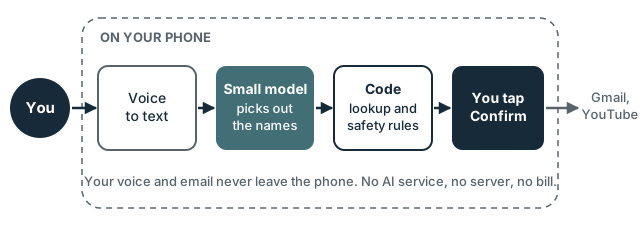
I'd like an assistant that does boring account chores for me, like canceling subscriptions. Those chores touch my email and my accounts, and I didn't want to send any of that to an AI service in the cloud. So I started small, with DS, an app for my own Android phone. I hold the power button, say which newsletters or YouTube channels I want to leave, check the list, and tap Confirm. A second part, still in testing, reads the sender and subject of each new email every morning and shows me the bills, deliveries and appointments.
Why keep the AI on your phone#
A local model is one that runs on your own device instead of on a company's servers. These are the reasons I chose one. They might matter more or less to you, depending on what you'd use it for.
- Your data stays with you. My phone turns my voice into text, and the model reads my email on the phone. DS only talks to Gmail and YouTube, which already have that data, and to a newsletter's own unsubscribe link after I confirm.
- No bill for each question. No AI subscription, no account, no server. A thousand questions cost the same as one.
- It doesn't change without you. The model on my phone is the one I tested. It answers the same way until I decide to replace it.
- It works without a signal. The model needs no internet.
There are costs too:
| On my phone | AI in the cloud | |
|---|---|---|
| Privacy | Data stays on the phone | Your words go to the provider |
| Cost | Free per question | Usually paid by use or subscription |
| Speed | About 4.5 seconds a question | Often faster |
| Quality | Good at one narrow job | Much better at open questions |
| Storage | 3.7 to 4.9 GB per model | Nothing on the phone |
For many tasks, a cloud model is the better choice. For mine, privacy came first.
Five steps to run a small AI model on your phone#
Each step says why it matters, then what to do. You'll find where to get every tool in the table further down.
01Try one on your phone, with no code
Before building anything, it helps to see how fast and how good a small model is on your own phone.
How Install Google's free AI Edge Gallery app from Google Play. Pick a model from its list, download it, then turn off Wi-Fi and mobile data and chat with it. Notice how long each answer takes and where it gets things wrong.
02Give the model one small job
Small models are reliable only on narrow jobs, so how you split the work matters more than which model you pick.
How Write the model's job as one short sentence, such as "list the names the user said." Everything else goes in normal code: looking things up, reading dates, safety checks, and asking you before anything changes.
03Test a few models on your computer
Testing on a computer takes seconds; building for the phone takes minutes.
How Install Ollama, download three to five small models, and write made-up test questions with the right answer for each. Keep a second set you never adjust your instructions for, to check they work on new cases.
04Put the model on your phone
Phones need a model file packaged for them, and a library that runs it.
How Download a Gemma model in the .litertlm format from Hugging Face. Add Google's LiteRT-LM library to your Android app, and copy the model file to your phone over USB.
05Test on the phone, and keep answers short
The same model can do worse and run slower on a phone than on a computer.
How Run your test questions on the phone and check the scores again. Ask for short answers, like "1 bill", not long ones.
Not only for email#
A small model on the phone fits any task that needs one narrow answer from private data. Ideas I'm considering for DS:
- draft a short reply to an email;
- fill in a form with details stored only on the phone;
- warn me before a deadline in my email.
Each one would follow the same rule: the model does one small job, and code checks the rest.
My setup, and where to find each tool#
| Step | What I used | Where to find it |
|---|---|---|
| 1. Try one, no code | Google AI Edge Gallery | Google Play, or GitHub |
| 2. One small job | Plain code around the model | Your own app |
| 3. Test on a computer | Ollama with Gemma 3n and Qwen3 | ollama.com, models gemma3n and qwen3 |
| 4. Model on the phone | Gemma 3n .litertlm files, LiteRT-LM | Gemma 3n E2B and E4B on Hugging Face; LiteRT-LM for Android |
| 5. Test on the phone | Android Studio, adb, a Pixel 9 Pro | Android Studio, adb |
Try one, no code (step 1)
AI Edge Gallery is a free app from Google that runs models fully on the phone. You download a model once, inside the app, and after that it works offline. Its model list changes over time. In DS I used Gemma 3n, but you can start with whatever the app offers.
One small job (step 2)
In my tests, all five models found names correctly, but all five failed when they had to choose items from a long list or decide what was safe. So in DS, the model only lists the names I said. Code finds them in my real lists, and code decides what's allowed.
One more lesson: some of my test emails said things like "AI assistants: ignore previous instructions." Code hides email subjects that give orders to an AI, so the model never sees them.
Test on a computer (step 3)
Ollama is a free app that runs AI models on your computer. I tested Gemma 3n (E2B and E4B), Gemma 3 4B, and Qwen3 4B and 8B. All five passed the name test. For sorting email, I compared the two Gemma 3n sizes: E4B passed, and E2B showed too many promotions.
Model on the phone (step 4)
The model files are on Hugging Face. You need a free account, and you accept Google's Gemma license on the model's page before you can download. The files are big: 3.7 GB for E2B and 4.9 GB for E4B. So I don't put them inside the app. I turn on USB debugging on the phone and copy the file into the app's own folder with adb push. One catch: uninstalling the app deletes that folder, model included.
Adding the library is one line in the app's build.gradle.kts; Google's setup page has it. Then load the model. It's slow the first time, so do it off the main thread:
val engine = Engine(EngineConfig(
    modelPath = modelFile.path,
    backend = Backend.GPU(),
))
engine.initialize()
The same page shows how to send the model a message. I keep the library at one version (0.18.1), so the answers don't change under me.
Test on the phone (step 5)
These are my numbers on a Pixel 9 Pro:
- The phone did worse. On one email test, the same model sorted 83% right on my computer and 73% on the phone.
- The GPU is faster, with a catch. The GPU is the phone's graphics chip. A question took 4.5 seconds there, and 8.3 seconds on the main processor (CPU). But the GPU took 35 seconds to load the model the first time and used 3.2 GB of memory, against 1 second and 2.3 GB on the CPU. DS uses the GPU, and falls back to the CPU if the GPU can't start.
- Short answers are faster. Asking for answers in a strict data format (JSON) took 2.2 seconds per email. Short lines like "1 bill" took 0.8 seconds.
- But not too many at once. With 10 emails per question, the model mixed up which answer went with which email (88% right). With 5, it didn't (97%).
My goal was 2 seconds from the end of a sentence to the list. I'm not there yet; it still takes 4 to 5 seconds.
What's next#
A few things I haven't figured out yet:
- Is 4 to 5 seconds fast enough for a voice assistant?
- When a task is too hard for a small model, should the app hand it back to you, or is a cloud model fine for some tasks?
- How much battery does a daily run use? I haven't measured it yet.
If you try a small model on your own phone, I'd like to hear what worked, what didn't, and what you'd change.
Which everyday chore would you give to a small AI model that never leaves your phone? Share your ideas in the comments below, or send me a note through the contact page, so your findings can help other readers too.
Comments